By a software engineer with 6+ years of professional experience, former startup CTO, and agency founder who has built real projects on every tool in this list.
Almost every vibe coding tool advertises itself as “free to start.” And technically, that’s true. You can sign up, open the editor, and watch AI generate code from your first prompt without entering a credit card.
But “free to start” and “free enough to actually evaluate” are very different things. I’ve used Cursor, Bolt, Lovable, Base44, Replit, and Tempo Labs extensively across client work, prototyping, and agency projects. Some of these free tiers are genuinely useful. Others are designed to get you invested for three hours and then hit you with a paywall at the worst possible moment.
Here’s what you actually get for free on each tool, what the upgrade path looks like, and what I wish someone had told me before I started.
If you’re still getting your head around what vibe coding even is, start with What is Vibe Coding and How Can It Help My Business? first.
Before You Pick a Tool: Ask Yourself Two Questions
I give this same advice to every founder and client who asks me “which tool should I try first?” Before you even look at pricing pages, answer these two questions:
1. Can you read code, even a little? If yes, tools like Cursor will feel natural and powerful. If no, you want something more visual like Lovable or Base44.
2. What does “done” look like for you? A quick prototype to test an idea? Something you’d show to investors? A product you’d hand to paying customers? Your answer changes which tool makes sense and how much the free tier will actually get you.
Those two answers usually point clearly to a tool. Let me walk you through each one.
1. Cursor: Best Free Tier for Developers Who Already Code
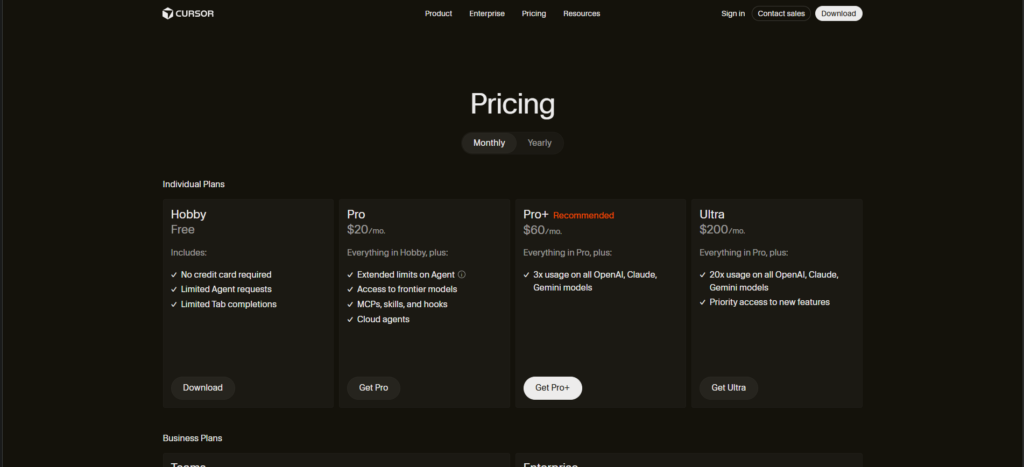
What you get for free: The Hobby plan includes 2,000 code completions and limited Agent requests per month with no credit card required. The full VS Code-based editor works without restrictions, including extensions, themes, Git, and terminal access.
What it actually feels like: If you already live in VS Code, Cursor is the lowest-friction upgrade possible. The free tier gives you enough to evaluate whether the AI autocomplete and chat features fit your workflow. But for active developers, 2,000 completions covers roughly one work week of AI-assisted coding. Heavy users will burn through the limit in a single focused session.
When you’ll hit the wall: The moment you start using premium models (Claude Sonnet, GPT-4o) for complex multi-file edits or Agent mode, the free requests disappear fast. The free tier feels more like a taste than a real trial.
Paid upgrade: Pro starts at $20/month with a $20 credit pool for premium models. Since June 2025, Cursor uses a credit-based system where different models consume credits at different rates.
My take: If someone already lives in VS Code, Cursor is a no-brainer recommendation. It’s not magic, but it’s a genuine multiplier on existing skills rather than a replacement for them. The free tier is enough to know if you want it. Just don’t expect to use it as your daily driver without upgrading.
2. Bolt.new: Most Generous for Quick Prototyping
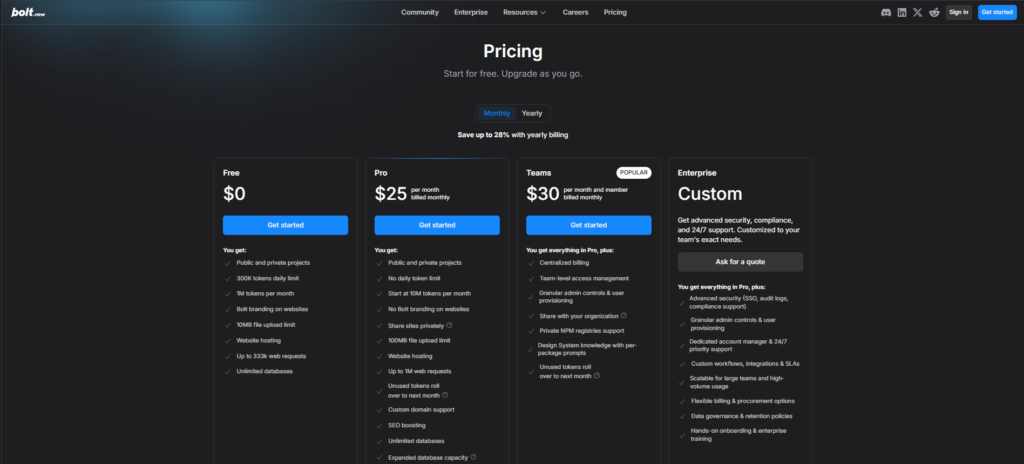
What you get for free: 1 million tokens per month with a 300,000 daily cap. You get the browser-based editor, AI prompts, public and private projects, website hosting, and unlimited databases.
What it actually feels like: Bolt is genuinely fast for demos and pitches. You describe what you want, and within minutes you have something that looks like a real app. For “I need to show this to someone on Friday,” it’s hard to beat.
When you’ll hit the wall: Tokens disappear much faster than you’d expect. The biggest cost isn’t your prompts. It’s Bolt syncing your project files. Every message requires the AI to read your entire codebase. A medium-complexity project can cost 150,000 to 500,000 tokens per prompt. On the free plan, that means 10 to 20 meaningful interactions with a real project. The 300K daily cap means you’ll hit a wall mid-session on anything beyond a simple landing page.
Paid upgrade: Pro starts at $20 to $25/month with 10 million tokens and no daily cap. Custom domains and removal of Bolt branding require a paid plan.
My take: Bolt earns consistent praise for offering a legitimately usable free experience. I’m upfront with clients that it’s not where you want to stay long-term (the code quality drops off as projects grow), but for rapid prototyping and client demos, it’s the tool I reach for first. The token system is more transparent than credit-based alternatives, even if it still surprises people how fast tokens burn on larger projects.
3. Lovable: Polished Experience, Tight Free Limits
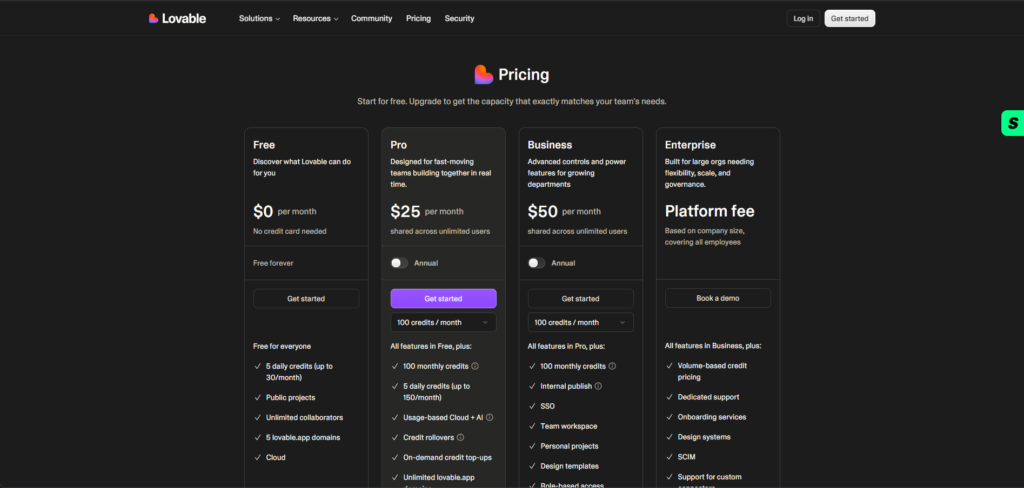
What you get for free: 5 daily credits that reset at midnight UTC, capped at roughly 30 credits per month. Public projects only, hosted on lovable.app subdomains. No custom domains, no code editing mode, and a Lovable badge on deployments.
What it actually feels like: Lovable has the most polished onboarding of any tool on this list. The visual feedback loop is excellent, and for non-technical users, the experience of describing something and watching it appear feels almost magical. It’s the tool I recommend first to solo founders with no coding background because that immediate visual feedback builds confidence.
When you’ll hit the wall: Fast. Five daily credits means roughly 3 to 4 meaningful interactions before you’re done for the day. An initial app generation costs 2 credits. A styling tweak costs 0.5. A complex feature like adding authentication can cost 1.5 or more. You can start a project and make a couple of tweaks, then you wait until tomorrow. Building anything real on the free plan requires patience across multiple days.
Paid upgrade: Pro starts at $25/month for 100 credits. Business at $50/month for teams. Student discounts of up to 50% are available with a verified university email.
My take: Lovable is frequently cited for hitting walls fast on the free plan. You can start a project easily, but meaningful apps quickly require credits you don’t have. My advice: try Lovable on the free plan for 30 minutes with a real use case in mind, not a toy project. If it clicks, great. If it frustrates you, switch to Base44 before spending money.
For a deeper comparison of these two approaches, see Vibe Coding for Non-Developers: What It Is, How It Compares to Low-Code, and Which One You Actually Need.
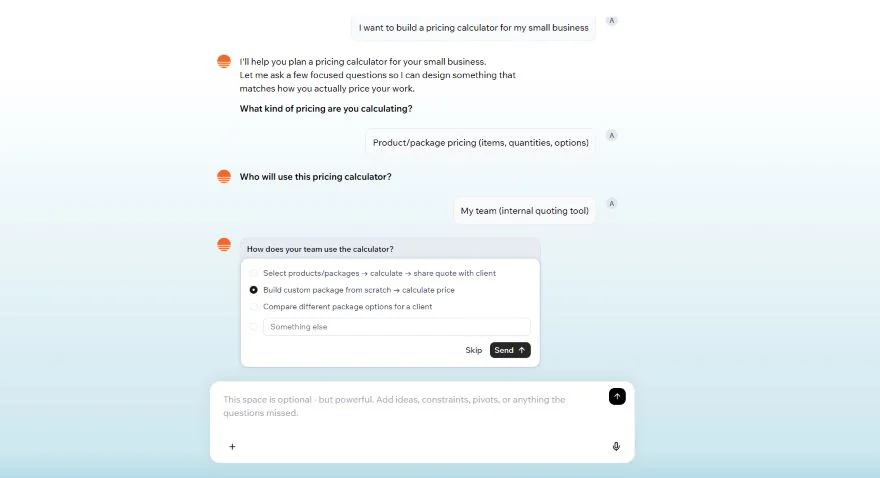
4. Base44: Best Free Tier for Building Something Functional
What you get for free: 5 messages per day and 25 messages per month. Access to all core integration types including user authentication, data storage, and more. You also get 500 integration credits for LLM calls, file uploads, image generation, and other backend features.
What it actually feels like: Base44 gets good marks because its free tier actually lets you build something functional end-to-end, not just a toy demo. If your app needs a database or backend logic out of the box, Base44 handles this better than most competitors on the free plan. The daily credit reset (5/day) is limiting but transparent.
When you’ll hit the wall: The 25 monthly message cap is strict, and credits don’t roll over. You can’t top up credits without upgrading. Custom domains require the Builder plan at $40/month. One common complaint from users is that credits can disappear fast when the AI needs multiple attempts to get something right.
Paid upgrade: Starter at $16/month (100 messages), Builder at $40/month (adds custom domains and GitHub integration), Pro at $80/month, Elite at $160/month.
My take: For non-technical founders whose app needs a backend (not just a pretty frontend), Base44 is where I’d point them after Lovable. The fact that authentication, database, and integrations are available on the free plan makes it uniquely practical for evaluating whether your idea is technically viable. Just know that the free plan is for evaluation, not for building your actual product.
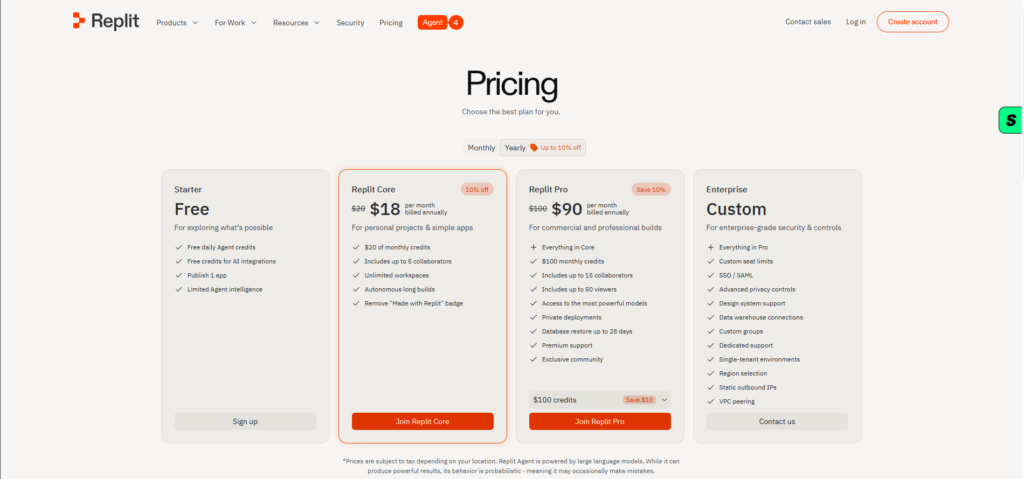
5. Replit: Best Free Tier for Learning and Students
What you get for free: The Starter plan includes free daily Agent credits, basic AI integration credits, development apps, and the ability to publish one app. Everything runs in the browser with no local setup required.
What it actually feels like: Replit has the longest track record with its free tier and is widely used by students and educators. The Agent can autonomously build basic apps, and the browser-based environment means zero setup friction. For someone who has never coded before and wants to understand what vibe coding feels like, Replit is the most accessible starting point.
When you’ll hit the wall: All free projects are public. The Agent’s intelligence is limited on the free plan. Published apps go down after 30 days. And once the free AI credits run out, the Agent stops working until they refresh. For anything beyond a learning exercise, you’ll need Core.
Paid upgrade: Core at $20 to $25/month with $20 to $25 in monthly usage credits, private projects, and full Agent access. Pro at $100/month for teams of up to 15 builders. Be warned: heavy users report actual monthly costs of $100 to $300 on top of the Core subscription, especially with frequent Agent use. Replit’s effort-based pricing makes costs genuinely hard to predict.
My take: Replit’s free tier limits are real but well-documented. It’s the tool I recommend for people who want to learn and experiment before committing money. But I always give the same warning: Replit’s pricing can surprise you once you start building seriously. The subscription is just the entry ticket. Set spending limits before you start.
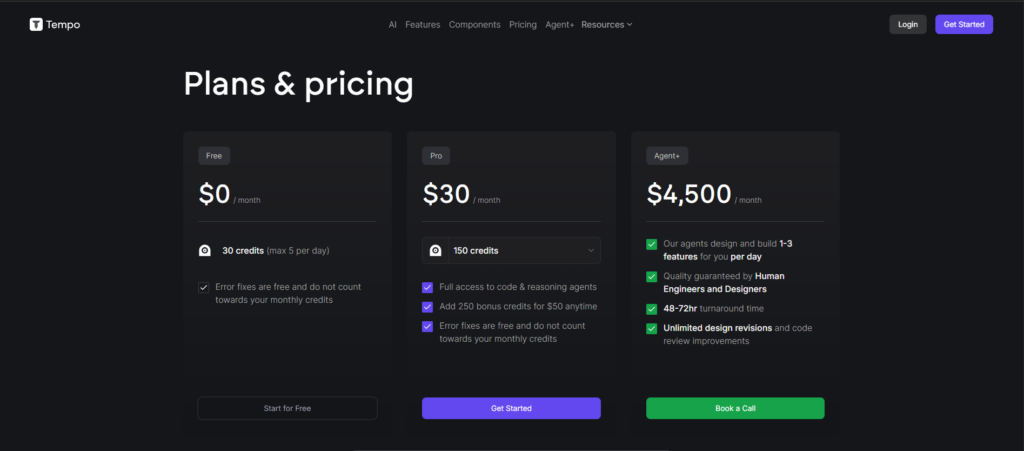
6. Tempo Labs: The Newer Contender
What you get for free: Tempo Labs offers a free tier for getting started with AI-powered frontend development, focused on generating React components and UI from natural language descriptions.
What it actually feels like: Tempo is newer to the scene and more specialized. Where tools like Bolt and Lovable try to be full-stack builders, Tempo focuses on the frontend layer, particularly React and design-system-aware code generation. For developers who need production-quality UI components, it fills a different niche.
My take: I’ve used Tempo Labs and it’s impressive for its specific use case. It’s not trying to be an everything-builder. If you’re a developer who needs to rapidly generate polished frontend components, it’s worth testing. But if you’re a non-technical founder looking to build a complete app, start with one of the full-stack tools above first.
What I Wish Every Tool Was Upfront About
After using all of these tools across dozens of projects, here’s what none of them tell you clearly enough on their pricing pages:
Credit burn rate is almost never shown honestly. Tools advertise “25 free credits/month” or “1 million tokens” but rarely tell you that a moderately complex prompt costs 2 to 4 credits, a database operation costs more, and a single real project can drain your monthly allowance in an afternoon. You only discover this mid-build, which is the worst possible time.
“Free deployment” almost always means their subdomain, not yours. Most tools let you deploy for free, but to a URL like yourapp.lovable.app or yourproject.base44.app. Custom domains are almost always a paid feature. For client work, that matters enormously, and it’s rarely front-and-center in the free plan description.
The code is yours, but good luck moving it. Several tools advertise that you can export or download your code. What they don’t say: the exported code is often tightly coupled to their infrastructure, their database layer, or their auth system. Taking it somewhere else isn’t impossible, but it’s rarely as clean as they imply.
Paywalls hit mid-project, not at sign-up. This is arguably the most frustrating pattern. You build something for three hours, get genuinely invested, and then discover that adding authentication, connecting a database, or removing their branding requires an upgrade. The free experience is sometimes deliberately designed to get you to that exact moment.
AI quality degrades as projects grow. None of these tools advertise that their AI suggestions get less coherent as your codebase gets larger. Context windows have limits. On a greenfield project, they feel magical. On a 50-file codebase, they start breaking things they previously fixed. I covered this in depth in What Are the Limitations of Vibe Coding?.
“No coding required” has a silent asterisk. It’s true for simple apps. But the moment something breaks, or the AI produces something subtly wrong, you need to either understand the code or pay someone who does.
My Recommendation Matrix
Here’s how I actually advise people based on their situation:
Solo founder, no budget, no coding background: Start with Lovable on the free plan for 30 minutes with a real use case. If it clicks, great. If it frustrates you, switch to Base44.
Developer who wants to move faster: Cursor, no debate. If you already live in VS Code, it’s the lowest-friction path.
Need something client-presentable quickly: Bolt.new for the prototype, then hand off to a proper development environment.
Team environment, shared codebase: Look at Replit Pro or evaluate Windsurf for its context-sharing capabilities.
Where I push back: A lot of founders ask “which tool?” when the real question is “should I be building this myself at all right now?” Sometimes the honest answer is: spend $500 on a freelancer for the first version, not three months learning a vibe coding tool.
For a fuller breakdown of how to think about this decision, read Vibe Coding vs Traditional Coding: Which One Should Your Business Actually Use?.
The Bottom Line
The total realistic cost to get a client-ready app (not a prototype, but something with a custom domain, authentication, no third-party branding, and backend integrations) is $50 to $100+ per month on most of these platforms. That’s perfectly reasonable. But it’s a very different conversation than “start free.”
None of this makes these tools bad. They’re genuinely useful. But going in with eyes open saves a lot of frustration, especially for founders who are already stretched thin on time and budget.
Start with the free tiers. Test with a real use case, not a tutorial project. And when you hit a wall, pay attention to what that wall tells you. Sometimes it’s the tool’s limitation. Sometimes it’s the complexity of what you’re building. Knowing the difference is where the real value lies.
Want to go deeper? Here’s more from the vibe coding series on Amayzing AI: